
Survival Log Safehouse Layout and Furniture
Quick answer
Survival Log layout is constrained by typed home slots rather than by floor space. Small, medium, large, wall-hanging, tabletop, bed, door and window items are each counted separately, so a house can be simultaneously full and empty depending on the category. Furniture is removed or returned through the Layout tool and the Home Slots panel, both of which are available without penalty.
How Survival Log home slots really work
Most base-building games limit you with floor area. Survival Log limits you with categories, and the difference catches everyone once. You can have plenty of visible room and still be unable to install a bed, because the bed counter is full while the small-item counter sits half empty.
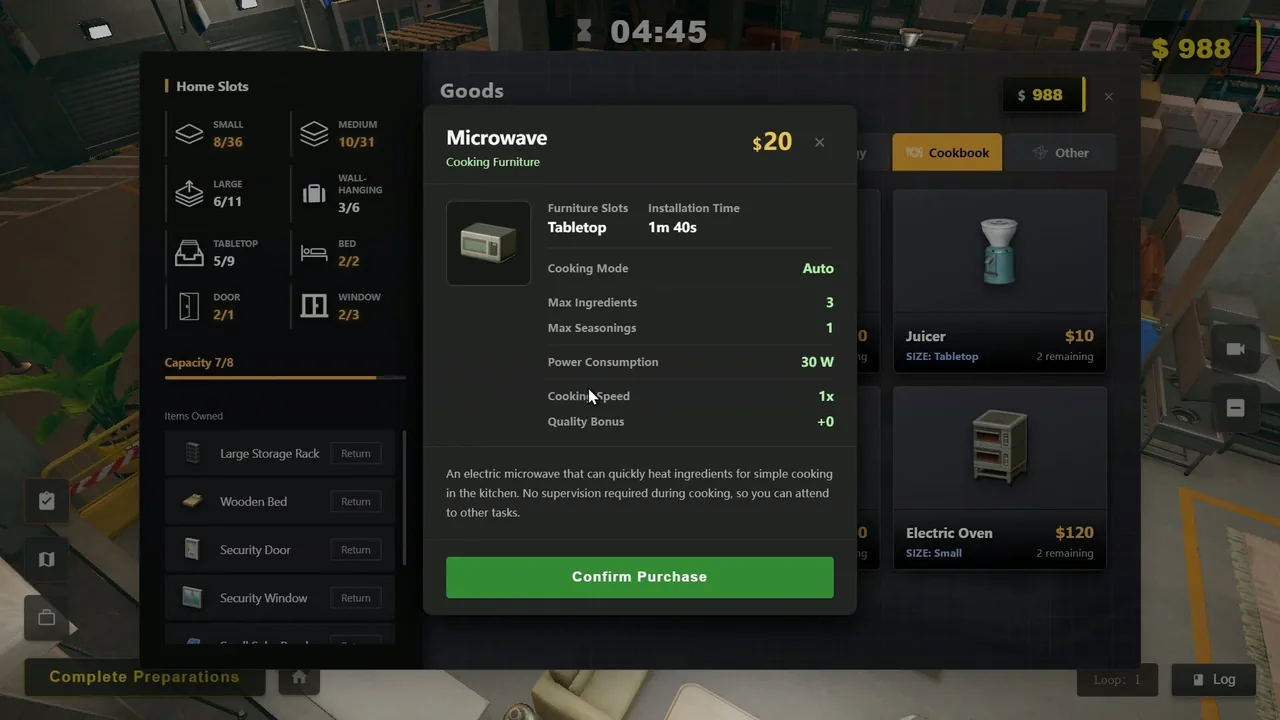
| Slot type | Used / total | What it holds | Pressure |
|---|---|---|---|
| Small | 8 / 36 | Compact appliances, small storage | Low - plenty of room |
| Medium | 10 / 31 | Mid-size furniture | Low |
| Large | 6 / 11 | Generators, big storage racks | High - fills fast |
| Wall-hanging | 3 / 6 | Wall-mounted items | Moderate |
| Tabletop | 5 / 9 | Microwave, juicer, small cookers | Moderate |
| Bed | 2 / 2 | Sleeping | Full |
| Door | 2 / 1 | Entry fortification | Over capacity |
| Window | 2 / 3 | Window fortification | Very tight |
| Overall capacity | 7 / 8 | Global cap | Nearly full |
Read that table as a warning about where your Survival Log layout will actually bind. Small and medium slots are generous. Large, bed, door and window slots are not. Any plan that assumes you can keep adding generators, beds or fortified entries is going to hit a wall well before you run out of cash.
The door counter reading 2/1 is the clearest illustration in the game: you can buy a second security door and have nowhere to put it. In Survival Log, always check the slot counter before the price tag.
How to remove or move furniture
This comes up constantly on the Steam forum - people buy something, regret it, and assume they are stuck with it. They are not. Survival Log gives you two separate tools:
- The Layout tool. On the right-hand rail alongside Log, Tactics and Track. This is how you reposition installed furniture and reorganise a floor without losing the item.
- The Return button. During the prep phase, the Home Slots panel lists every item you own with its own Return control. Screenshots show Large Storage Rack, Wooden Bed, Security Door and Security Window each with one.
- Floor reassignment. Use the floor selector - 2F, Home, Basement - to move bulky equipment off the floors you live on.
- Plan before installing. Installation costs time, which during prep is your scarcest Survival Log resource. A microwave takes 1m 40s; larger items cost more.
Planning three floors
With 2F, Home and Basement available, the layout that works assigns each floor a job rather than scattering functions across all three.
- Basement. Power and bulk storage. Generators are large-slot items and the basement is where they stop competing with living space. It is also insulated from the entrances that sieges target.
- Home (ground floor). Kitchen, beds, workbench. This is where your daily Survival Log routine happens, so keep travel short - cooking and sleeping on the same floor saves real time every day.
- 2F and rooftop. Farming and solar. Grow boxes, plant lights and panels all want the top of the house, and official screenshots show exactly this arrangement.
The reason this matters beyond tidiness is that room temperature is tracked per floor - the HUD shows readouts like "1st Floor Room Temperature" and environmental states such as "Slight Chill". A Survival Log layout that spreads essential activity across three floors means heating three floors, which multiplies your power draw during exactly the cold snaps that threaten it.
The layout mistake that costs runs
Filling large slots early with storage racks feels productive, then leaves no room for a generator later. Because power is the system that everything else depends on, reserve large-slot capacity for it deliberately before your Survival Log stockpile expands to fill the space. Storage can be reorganised; a generator with nowhere to go cannot.
Survival Log FAQ: Layout & Furniture
How do I remove furniture in Survival Log?
Use the Layout tool on the right-hand rail to edit placement, and use the Return option in the prep-phase Home Slots panel to give back items you have bought but do not want. Screenshots show every owned item with its own Return button.
What are home slots in Survival Log?
Typed capacity categories that limit what your house can hold. Screenshots show separate counters for small, medium, large, wall-hanging, tabletop, bed, door and window items, plus an overall capacity figure.
How many floors does a Survival Log safehouse have?
Screenshots show a floor selector with a second floor, the ground floor labelled Home, and a basement, giving three usable levels.
Can I own more items than I can install?
Yes, and it is a common Survival Log mistake. A screenshot shows a door counter reading 2/1 - two owned against one slot. Check counters before buying.
Where should the generator go?
The basement, in most layouts. It keeps large equipment out of living and storage space on the floors you use daily.